1. Introduction
With the introduction of a new JSON-based data transfer format, it is essential to ensure backward compatibility with the existing Siemens 95 data transfer format. This proposal outlines the necessary steps and considerations to achieve this compatibility while maintaining the integrity and functionality of both formats.
The next sections provide a brief recap of the Siemens 95 format and highlight the differences from the new JSON format.
2. Siemens 95 Data Transfer Format Overview
The Siemens 95 data transfer format is a text-based format that organizes data as key‑value pairs, using the semicolon as a delimiter. Keys are always three characters long.
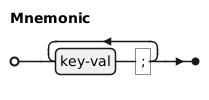
Because the character ; is used as a delimiter, it must not appear within keys or values.
To allow special characters within values, URL encoding is applied to values.
Then the semicolon character can be used within values as %3B.
To include the percent character itself, it is encoded as %25.
Generally, any other special character can be encoded using the percent-encoding scheme, but this is usually not necessary.
Spaces are allowed within values and do not need to be encoded.
To transfer characters outside the ASCII range, Siemens 95 uses UTF-8 encoding.
PSA10;GAC1;TARDefault;SEMSemicolon%3BTest;PERPercent%25Sign;
{
  "PSA": 10,
  "GAC": 1,
  "TAR": "Default",
  "SEM": "Semicolon;Test",
  "PER": "Percent%Sign"
}
To decode a Siemens 95 message, perform the following steps:
-
Binary data is interpreted as a UTF-8 encoded string.
-
The string is first split at each semicolon character.
-
Then each key‑value pair is split after the third character.
-
Finally, the values are URL-decoded to retrieve the original values.
3. Differences from JSON Format
3.1. Structural Differences
The new JSON format represents data as a hierarchical structure using objects and arrays. Siemens 95 format is flat and originally does not support nested structures. Therefore, the structural mapping is straightforward.
3.2. Value Differences
In JSON format, values can be of different types such as strings, numbers, booleans, arrays, or objects. In Siemens 95 format, all values are represented as strings, although they may represent different types of data. This requires special handling during the conversion process to ensure that the correct types are assigned in JSON.
4. Conversion Rules
To assign correct types in JSON, a type inference mechanism needs to be implemented during the conversion process. Because some mnemonics are known to always represent a specific type, they can be used to assign the correct JSON types.
The rules are as follows.
-
Mnemonics known to be strings, although it contains only numbers (
DAT,TIM,PED,PET,OPI,OSM,FMD,FDD,FXD) → JSON string -
Mnemonics known to be hexadecimal numbers (
FSA,FSI,AFB,IPN,PRT,WIW,SKE) → JSON number (converted from hexadecimal to decimal) -
Value matches decimal number (
^\d+\.?\d*$) → JSON number -
Value matches boolean (
^(true|false)$, case-insensitive) → JSON boolean -
Value matches null (
^null$, case-insensitive) → JSON null -
Value matches object (
^\{.*\}$) → JSON object -
Value matches array (
^\[.*\]$) → JSON array -
Otherwise → JSON string
5. Backward Conversion from JSON to Siemens 95
Converting back from JSON to Siemens 95 format is relatively simple. All values must be converted to strings. Special care must be taken for hexadecimal numbers, which need to be converted back to hexadecimal representation. Also, special characters within values need to be URL-encoded to ensure compatibility with the Siemens 95 format.
6. Conclusion
This proposal outlines the necessary steps to ensure backward compatibility between the Siemens 95 data transfer format and the new JSON format. By implementing the defined conversion rules and handling special cases, it is possible to maintain interoperability between systems using either format. This ensures a smooth transition to the new format while preserving existing functionality.